Acycle macOS Apple Silicon Startup Issue Report
Content / 内容
- English: Acycle macOS Apple Silicon Startup Issue Report
- 中文:Acycle macOS Apple 芯片启动问题报告
English Report
Author: Xinwen Zhang
Acycle
Version: 3.0.2_AppleMChip_Runtime2026a
Operating System
macOS (Apple Silicon M-series chip)
MATLAB Runtime R2026a Update 4 (installed separately)
Problem Description
After downloading the Acycle3.0.2_AppleMChip_Runtime2026a.app version and placing it in the Applications folder, double-clicking the application icon produces no response and the application cannot start normally.
Prerequisite: Acycle_3_0.app can be opened normally by double-clicking.
Terminal Error Message
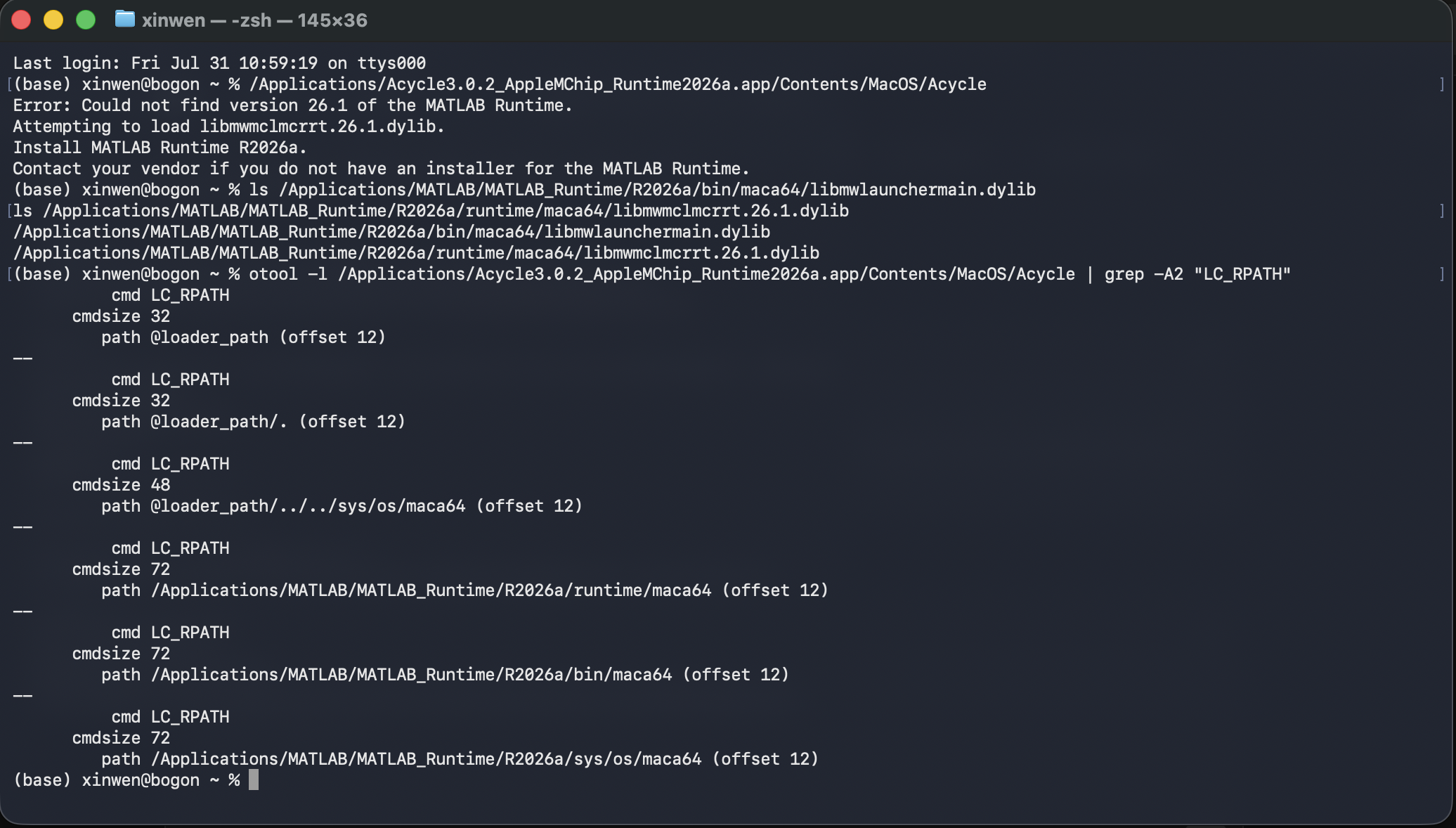
Running the executable directly from Terminal produces the following error:
dyld[21183]: Library not loaded: @rpath/libmwlaunchermain.dylib
  Referenced from: /Applications/Acycle3.0.2_AppleMChip_Runtime2026a.app/Contents/MacOS/Acycle
  Reason: tried: '/Applications/Acycle3.0.2_AppleMChip_Runtime2026a.app/Contents/MacOS/libmwlaunchermain.dylib' (no such file)
Environment Verification
MATLAB Runtime R2026a has been confirmed to be correctly installed. The related library files are located at the following paths:
/Applications/MATLAB/MATLAB_Runtime/R2026a/bin/maca64/libmwlaunchermain.dylib
/Applications/MATLAB/MATLAB_Runtime/R2026a/runtime/maca64/libmwmclmcrrt.26.1.dylib
Root Cause Analysis
The rpath (runtime library search path) of the Acycle executable does not include the standard installation path of MATLAB Runtime, causing failure to load the required dynamic libraries.
The original rpath was inspected using otool -l:
cmd LC_RPATH
cmdsize 32
path @loader_path (offset 12)

path @loader_path/. (offset 12)

path @loader_path/../../sys/os/maca64 (offset 12)
All of the above paths point to locations inside the application bundle, while MATLAB Runtime is installed separately in the system path; therefore, the required library files cannot be found.
Temporary Workaround
Method: Launch through environment variables
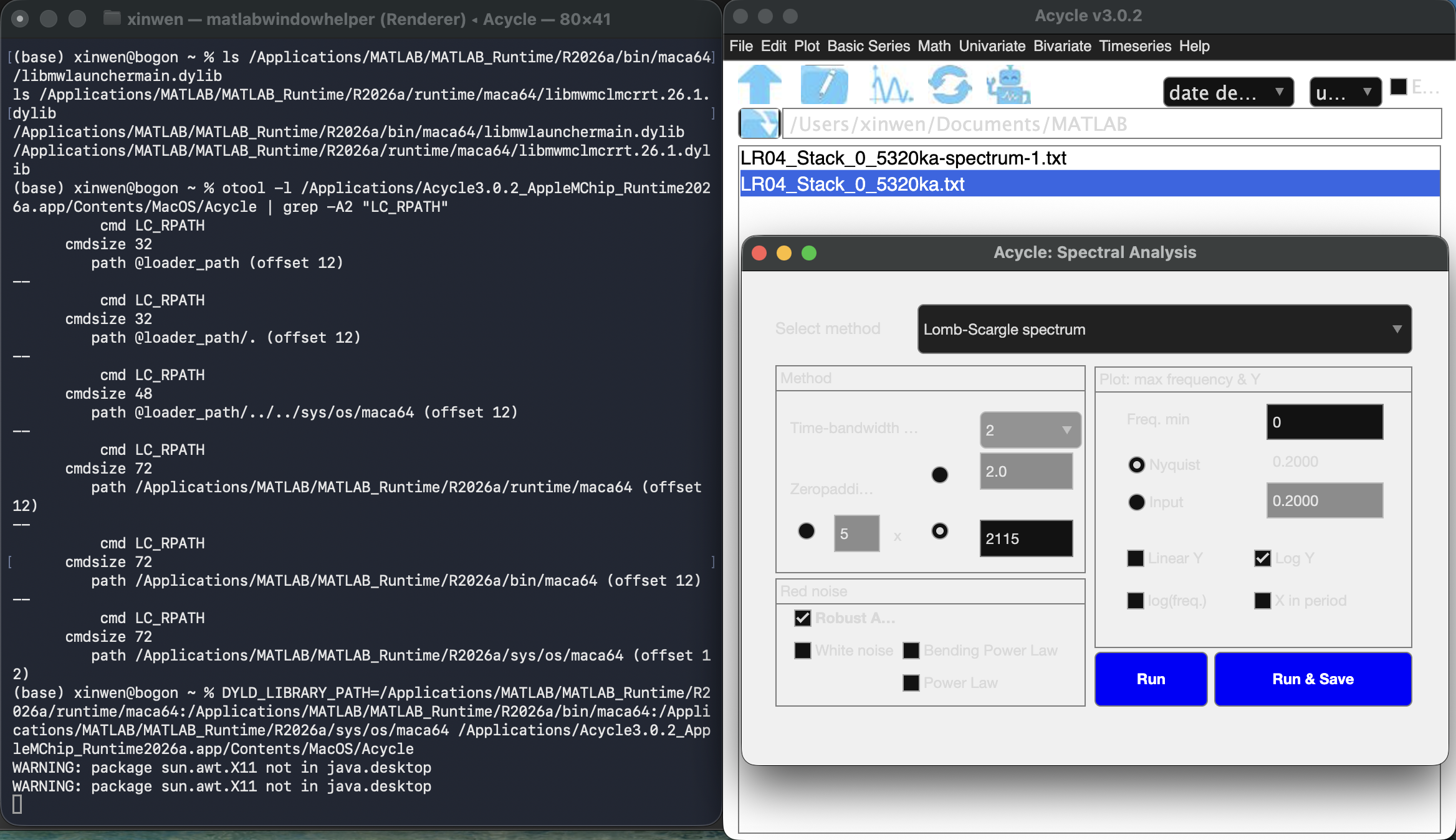
Executing the following command in Terminal allows the application to start normally:
DYLD_LIBRARY_PATH=/Applications/MATLAB/MATLAB_Runtime/R2026a/runtime/maca64:/Applications/MATLAB/MATLAB_Runtime/R2026a/bin/maca64:/Applications/MATLAB/MATLAB_Runtime/R2026a/sys/os/maca64 /Applications/Acycle3.0.2_AppleMChip_Runtime2026a.app/Contents/MacOS/Acycle
中文说明:Acycle macOS Apple 芯片启动问题报告
作者: 张馨文
Acycle
版本: 3.0.2_AppleMChip_Runtime2026a
操作系统
macOS(Apple Silicon M 系列芯片)
MATLAB Runtime R2026a Update 4(单独安装)
问题描述
下载 Acycle3.0.2_AppleMChip_Runtime2026a.app,并将其放入“应用程序”文件夹后,双击应用程序图标没有任何响应,程序无法正常启动。
前提:Acycle_3_0.app 可以通过双击正常打开。
终端错误信息
直接在终端中运行可执行文件时,出现以下错误:
dyld[21183]: Library not loaded: @rpath/libmwlaunchermain.dylib
  Referenced from: /Applications/Acycle3.0.2_AppleMChip_Runtime2026a.app/Contents/MacOS/Acycle
  Reason: tried: '/Applications/Acycle3.0.2_AppleMChip_Runtime2026a.app/Contents/MacOS/libmwlaunchermain.dylib' (no such file)
环境验证
经确认,MATLAB Runtime R2026a 已正确安装。相关库文件位于以下路径:
/Applications/MATLAB/MATLAB_Runtime/R2026a/bin/maca64/libmwlaunchermain.dylib
/Applications/MATLAB/MATLAB_Runtime/R2026a/runtime/maca64/libmwmclmcrrt.26.1.dylib
根本原因分析
Acycle 可执行文件的 rpath(运行时库搜索路径)中未包含 MATLAB Runtime 的标准安装路径,因此无法加载所需的动态库。
使用 otool -l 检查原始 rpath,结果如下:
cmd LC_RPATH
cmdsize 32
path @loader_path (offset 12)

path @loader_path/. (offset 12)

path @loader_path/../../sys/os/maca64 (offset 12)
以上路径均指向应用程序包内部的位置,而 MATLAB Runtime 是单独安装在系统路径中的,因此程序无法找到所需的库文件。
临时解决方法
方法:通过环境变量启动
在终端中执行以下命令,可以使应用程序正常启动:
DYLD_LIBRARY_PATH=/Applications/MATLAB/MATLAB_Runtime/R2026a/runtime/maca64:/Applications/MATLAB/MATLAB_Runtime/R2026a/bin/maca64:/Applications/MATLAB/MATLAB_Runtime/R2026a/sys/os/maca64 /Applications/Acycle3.0.2_AppleMChip_Runtime2026a.app/Contents/MacOS/Acycle
手动指定库文件路径后,程序可以正常启动。